Lesson 4: How to retrieve files from an archive
In this lesson we will:
- Recall a file from an archive, by transferring it to another collection
- Extract the contents of the tar file
Transfer from an archive to another collection
To recall a file from an archive, we simply reverse the process from the previous lesson and transfer from the archive collection to another collection. This will initiate a recall from tape and the copy will take a bit longer than if it was going into the archive.
To perform the process, as usual we visit app.globus.org to access our Globus collections. We will continue with the example of Archive-QM-Globus-Training that we have used for previous lessons. We can copy data to any collection that we have permissions for.
Extracting all of the data
If we want all of the data in the tar file, we can transfer to the QM-Globus-Training collection, extract the data and delete the tar file, so long as we have space. i.e.
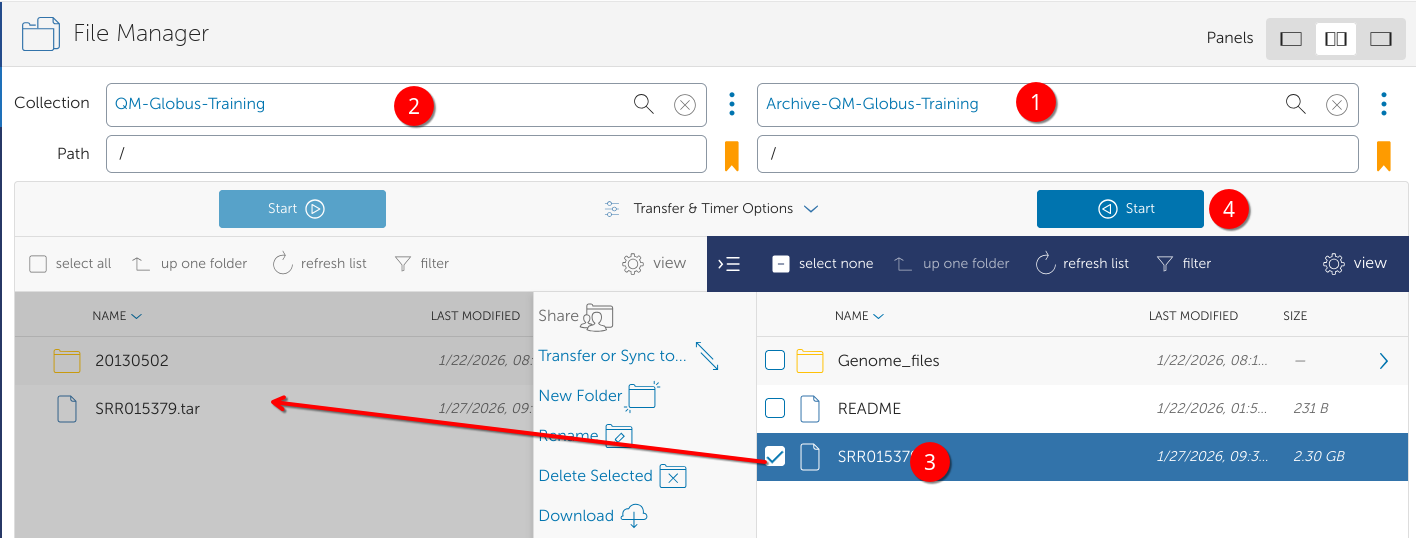
- In dual pane view, Select the Archive collection e.g. Archive-QM-Globus-Training
- Select the destination collection, e.g. QM-Globus-Training
- Select the file to recall
- Click Start to transfer.
The activity tab shows the progress.
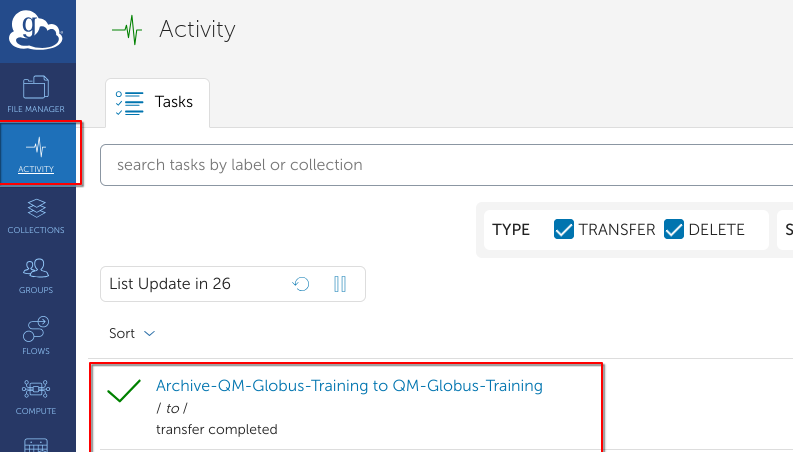
Once the file is transferred, we can extract it and delete the original tar file, to save space.
~$ cd /data/QM-Globus-Training/globus/
globus$ ls
20130502  SRR015379.tar
globus$ tar xvf SRR015379.tar
SRR015379/
SRR015379/SRR015379_1.recal.fastq.gz
SRR015379/big_file9.gz
SRR015379/big_file5.gz
SRR015379/big_file7.gz
SRR015379/big_file3.gz
SRR015379/big_file6.gz
SRR015379/big_file4.gz
SRR015379/big_file1.gz
SRR015379/SRR015389.recal.fastq.gz
SRR015379/big_file10.gz
SRR015379/big_file2.gz
SRR015379/big_file8.gz
SRR015379/SRR015379_2.recal.fastq.gz
globus$ rm SRR015379.tar
globus$
Extracting some of the data
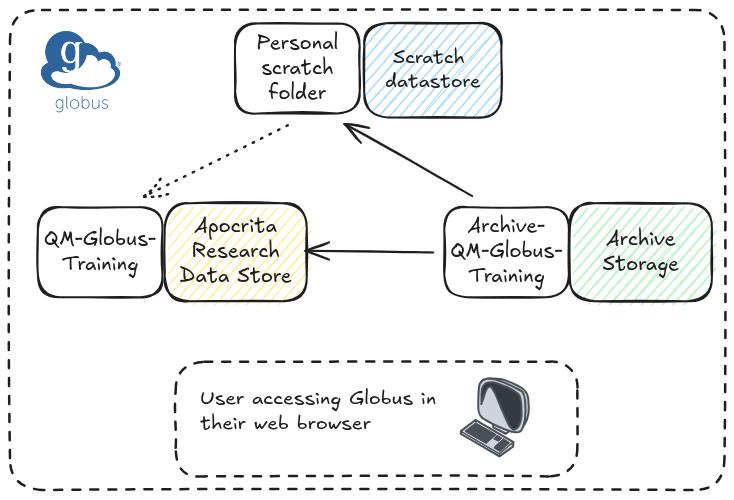
For this example we will demonstrate how using scratch storage can be useful as
an intermediate space for extracting data. By default, all Apocrita users have
a 3TB quota of scratch space, which is high performance storage that is not
backed up. Globus collections also exist on the scratch storage under the
globus directory for each user e,g. /gpfs/scratch/$USER/globus. By design,
these collections on scratch cannot be shared with other users other than
yourself i.e. you cannot create guest collections on scratch.
If you want to recall a large tar file from the archive in order to extract a few constituent files for temporary use, you could do the following:
- transfer data from the archive to scratch storage
- extract only the files you need from the tar file
- optionally transfer the required files to your permanent storage
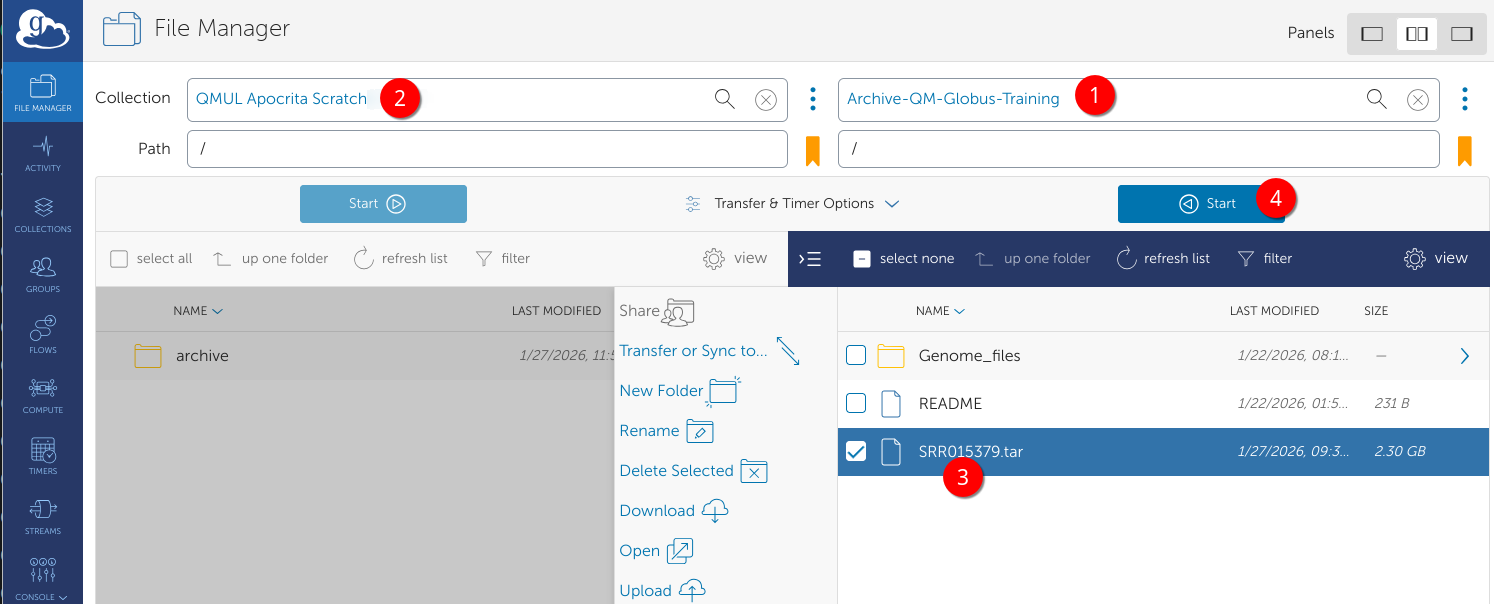
Hopefully now the process will be familiar - in a dual pane view:
- open the Archive Collection
- search for QMUL Apocrita Scratch (UUID 28d3101c-1631-499c-9809-a301a645245a)
- Select the file to recall
- Press Start
An email will arrive when complete, or you can alternatively monitor tasks in
the activity tab.
The file has now appeared in my scratch directory. In a terminal session, go to /gpfs/scratch/$USER/globus and inspect the tar file with tar tf <filename>.
If you want to extract only some files, you can specify them exactly as shown in the inspection list.
globus$ ls
archive  SRR015379.tar
globus$ tar tf SRR015379.tar
SRR015379/
SRR015379/SRR015379_1.recal.fastq.gz
SRR015379/big_file9.gz
SRR015379/big_file5.gz
SRR015379/big_file7.gz
SRR015379/big_file3.gz
SRR015379/big_file6.gz
SRR015379/big_file4.gz
SRR015379/big_file1.gz
SRR015379/SRR015389.recal.fastq.gz
SRR015379/big_file10.gz
SRR015379/big_file2.gz
SRR015379/big_file8.gz
SRR015379/SRR015379_2.recal.fastq.gz
globus$ tar xvf SRR015379.tar SRR015379/SRR015379_1.recal.fastq.gz SRR015379/big_file1.gz
SRR015379/SRR015379_1.recal.fastq.gz
SRR015379/big_file1.gz
globus$ ls SRR015379
big_file1.gz  SRR015379_1.recal.fastq.gz
When you are finished, you can delete the tar file e.g. rm SRR015379.tar.
These extracted files can either be analysed via HPC jobs on the scratch storage, if it is only required for the short term, or transferred using Globus to another collection, whether on Apocrita or an external collection that you have write permission.